Workflow automation for product teams
Ship work, not status updates.
Nexora connects your tools, automates the busywork between them and shows you exactly what is moving. Build a flow in minutes and watch it run.
14-day trial · No credit card · Cancel anytime
Teams at fast-moving companies run on Nexora
Lumio
parallax
Cobalt&Co
Fieldnote
QUILL
Harborly
Demo placeholders: fictional brand names. Replace them with your customers' or partners' logos.
The platform
One workspace for the whole delivery loop.
Everything you need to design, run and understand automated work, without stitching together five separate tools.
A visual builder that thinks like you do
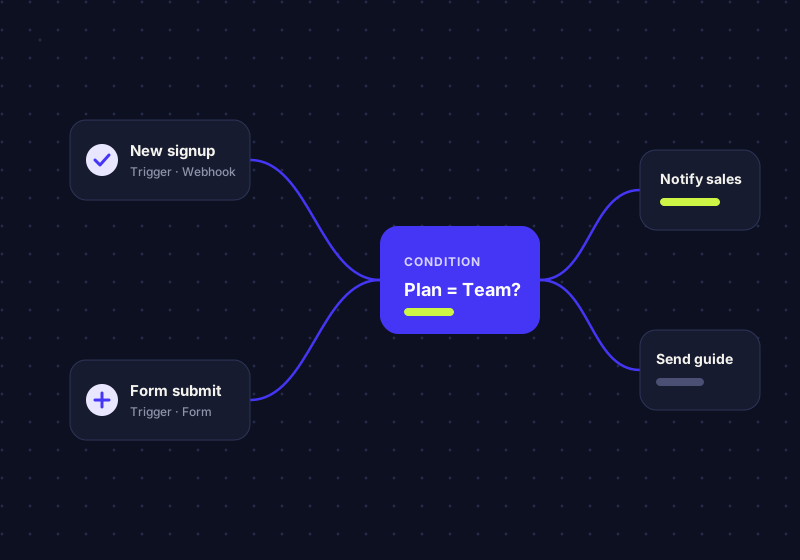
Drag triggers, conditions and actions onto the canvas. Branch, loop and retry without writing a line of code.
Live run logs
Follow every run in real time and replay any step when something looks off.
Roles and audit trail
Granular permissions and a complete history of who changed what, and when.
Analytics that explain the why
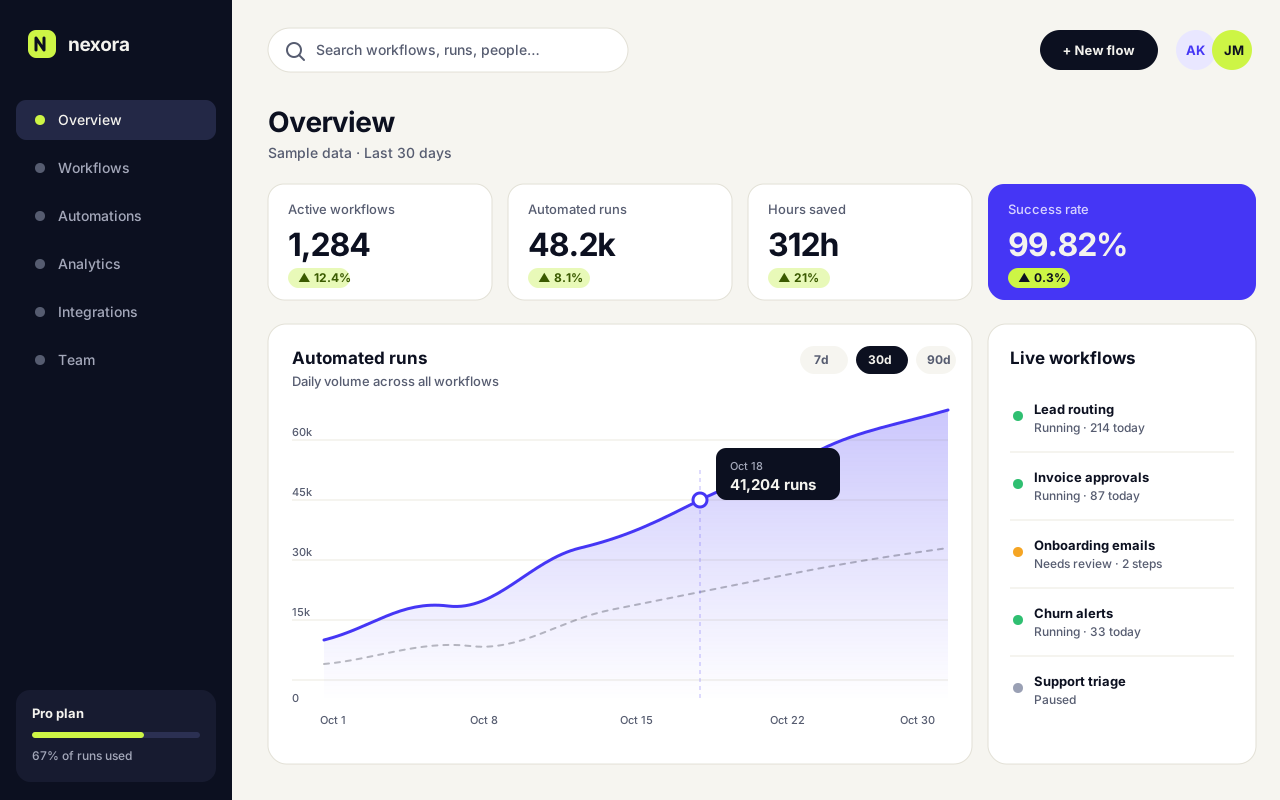
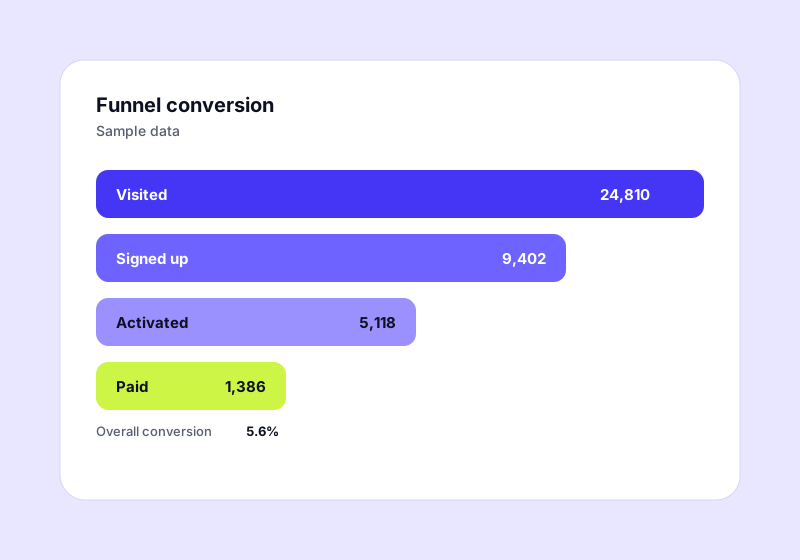
Funnels, cohorts and run-level metrics sit next to the workflows that drive them, so you can act on what you see.
Automation
Let the busywork run itself
Route leads, approve invoices and nudge customers automatically. Nexora handles the handoffs so your team can focus on judgement calls.
- 200+ ready-made triggers and actions
- Automatic retries and error alerts
- Versioned flows you can roll back
Insight
Know what is working, instantly
Every flow reports its own throughput, failures and time saved. Share a live dashboard with stakeholders instead of writing another recap.
- Funnels and cohorts built in
- Shareable, read-only dashboards
- Scheduled reports to email or chat
How it works
From idea to automated in four steps.
Most teams ship their first flow on day one. No consultants, no migration project.
01
Connect
Link the tools your team already uses with a few clicks.
02
Design
Map the process on the canvas, or start from a template.
03
Test
Dry-run with sample data and inspect every step before it goes live.
04
Launch
Publish, monitor and improve with live metrics and run logs.
Use cases
Built for the way every team works.
01
Revenue teams
Score and route inbound leads in seconds, keep the CRM clean and trigger the right follow-up automatically.
02
Operations
Replace spreadsheets and chasing with approvals, handoffs and SLAs that run on rails.
03
Engineering
Connect incidents, deploys and tickets so the right people know the moment something changes.
04
Customer success
Spot at-risk accounts early and kick off playbooks before a renewal is in doubt.
Integrations
Plays well with the tools you have.
Connect your stack in a few clicks, or reach anything with an API through the built-in HTTP and webhook actions.
Sample tiles: generic categories shown for demonstration. Replace with the apps you support.
M
C
Calendar
Scheduling
C
Chat
Messaging
C
CRM
Customers
B
Billing
Payments
D
Database
Data
D
Docs
Knowledge
F
Forms
Intake
S
Storage
Files
H
Helpdesk
Support
C
Code
Engineering
M
Metrics
Analytics
Pricing
Simple plans that scale with you.
Start free, upgrade when your team is ready. No hidden fees, no long contracts.
Starter
$0 forever
For individuals and small experiments.
- 3 active flows
- 1,000 runs per month
- Community support
Most popular
Team
$24 per user / month
For growing teams that run on automation.
- Unlimited flows
- 50,000 runs per month
- Run logs and analytics
- Priority email support
Scale
Custom
For organisations with security and scale needs.
- Everything in Team
- Single sign-on and audit log
- Dedicated success manager
- Custom SLAs
Sample pricing for demonstration. Edit plans, prices and features directly in the editor.
FAQ
Questions, answered.
Cannot find what you are looking for? Our team replies within one business day.
How long does it take to get started?
Most teams build and publish their first flow in under an hour. Start from a template or a blank canvas.
Can I change plans later?
Yes. Upgrade, downgrade or cancel at any time from your account settings. Changes apply on your next billing date.
Do you offer a free trial?
Every paid plan includes a 14-day trial with no credit card required. The Starter plan is free for as long as you need it.
Is my data secure?
This is demo copy. Replace it with an honest summary of your security practices, certifications and data handling.
Can I connect tools that are not listed?
Yes. Use the HTTP request and webhook actions to talk to any service that exposes an API.
How do I get help?
Starter customers can use community support. Paid plans include email support, and Scale includes a dedicated success manager.
Put your busywork on autopilot.
Join teams that ship faster with fewer meetings. Start free today and publish your first flow in minutes.